
Sunday, 24 February 2013

Wednesday, 9 January 2013


Saturday, 13 October 2012
Thursday, 11 October 2012
How to Remove Bad CC in Sims 3
 |
| Which icon do you have? |
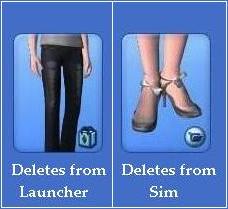
Deleting from the Launcher
__________________________________________________________________
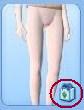 Custom files with this logo in
 create-a-sim are sim3packs.
The logo looks like a bag.
They can't be deleting in-game.

(Hooray!)
Sims3pack not showing in the launcher? Click here
 Step 3: Delete the 0x-codes associated to the bad CC from /sims3/dcbackup folder. You'll find the codes under each image of bad cc in the lists given above.
Hidden Bad cc keeps circulating because it can stick to sims you save without being selected. It is then hidden until the next person installs it.
When you save a Sim, the game uses the files in the DCbackup folder to attach CC. It does not copy them from the game, c-a-s, the launcher or the downloads folder. ONLY from the DCbackup folder. Delete bad cc codes, but keep good cc codes.
When you save a Sim, the game uses the files in the DCbackup folder to attach CC. It does not copy them from the game, c-a-s, the launcher or the downloads folder. ONLY from the DCbackup folder. Delete bad cc codes, but keep good cc codes.
Most users are oblivious their Sim is infected, people are not doing this on purpose to annoy you. Delete Ox codes to stop the spread, especially if you share your sims online.
Deleting from the Sim
__________________________________________________________________

These files are attached to an actual Sim. The only way to delete them is to delete the entire Sim wearing the items you want to remove. Custom Sims are deletable from inside the game in the pre-mades menu, and the launcher. You can use either, you don't need to do both.
If there are files you want to keep on this on the sim that needs deleting, you can either remove the items you don't want, then resave the sim. Or save the good items, including hair, to a new sim before you delete. (whichever is quicker)
The newly shared/saved sim will be in your docs/ea/sims3/exports folder. Double click to install the good content back into the game. Or drag and drop to the sims3/downloads folder and the files will then show up in the downloads tab of the launcher ready to be selected and installed.
- If you have a lot of Sims to go through try opening ..sims3/downloads folder and select the 'date modified' tab. This will put the content you have in date order which may help you narrow the search down.
- You'll need to manually delete the sim from the downloads folder if it's still in there. That way you won't accidently reinstall the things you just got rid of.
- If you have trouble with double click when installing a sim saved from exports folder. Drag and drop or copy the file in to the Sims3/downloads folder. It will now show up in the downloads tab of the launcher and you can install the Sim in the usual way.
Other problems related to this file type
Even when it is not technically bad cc, these files only have one body size and type. So if your sim gains a few pounds, or becomes pregnant, this outfit will remain the same.
With clothing, you'll see breaks in necklines', ankle's and waists. With hair you'll see the scalp through the hair or hair goes through the face or body. If you tend to play your sims all the one size it won't bother you. Personally, I delete them. You can get equally good hair and clothing for free in sim3pack form, from TSR and these artists.

__________________________________________________________________
My strongest recommendation would be to not download whole Sims. But we all do! There are some easier ways of keeping on top of bad cc here for future downloads.
If you use CUSTARD, You can check you own sims and downloads for the hidden sims3pack files. Not the second file type though, unfortunately. The hidden sims3packs look like this:

b = baby
p = Pre-school/toddler
c = Child
t = Teen
ya = Young Adult
m = Male
f = Female
Any questions? Let me know below (:
Wednesday, 10 October 2012
Why people upload bad CC?

If you have ever shared Sims on the exchange while having the typically known bad files in your game, it is very likely you too have spread them.
You can check your own files by downloading them and opening them with Custard or add the links to this post and I will look at them for you. Or you can email them to me peoplewatcherblog@gmail.com
|
| Click to Enlarge |
A Sticky CC theme:
The files in the launcher image have things in common. Opening them in Custard you can see they are in all ages including baby, all clothing types including; pregnancy, Naked, Singed and all career paths and levels.
Files that are made all categories included Naked mode tend to be the sticky ones. Or hidden ones, if you like. I am guessing here but I think the game mistakes them for genuine nude files that Sims have for showers and baths. They are located in the game but hidden from the average gamer.
________________________________________________
Other strange goings on
 I had a Sim loaded with four bad cc files. I isolated one piece of clothing at a time to see what happens. When I removed this skin 'front bum' the four files stopped sticking!
 I played with that skin and countless times BUT I have several copies of the skin Front bum and when I loaded it in to the game via a clean Sim who just happen to have that skin, this DID NOT make those same sticky files stick..
There are other skins that do this too, but I doubt it is the skin itself at fault and believe they are safe to play with. If you have one that is attaching sticky files, the only way to remove skins is to delete the Sim it came with unfortunately. More advice on that here Removing CC
The best advice I can offer is DO NOT download whole Sims. Download individual clothing and other items from The Sims Resource. Its' hosts oodles of free stuff, files are sims3packs (visible in the launcher) and all clearly marked how they are categorized.
Subscribe to:
Posts (Atom)