Removing CC Tips

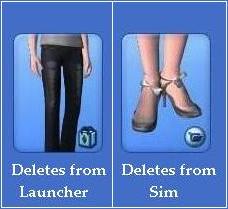
  1. To remove bad cc you can see in create-a-sim - Delete from the Launcher
  2. To prevent files reattaching themselves after removal - Delete 0x codes
  3. How to remove files not showing in the launcher Read More...

Wednesday, 17 March 2021

How to get unbroken Free Custom Content for The Sims 3 without bugs, glitches or nightwear in your day-wear!

Each to their own, but I don't like Swimwear in my Formal attire. You just know the game will choose the misplaced outfits for sims all over town! However, all this is personal preference.

The kind of glitches that can't be ignored and ruin the game, are because the outfit is categorised for a different age or character than it was built for. Behold:


As quick and (delusion-ally) safe as it seems to download through The Sims 3 exchange, when you calculate the time spent looking for adorable outfits, and the time getting the bad ones out again, you've wasted time! Instead I'd like to direct you to THE SIMS RESOURCE

I'd like to mention at this point, this is not a paid post or advert of any kind.

The Sims resource is completely free with over a million pieces of content. It is NOT IMMUNE from bad content, but you can SEE IN ADVANCE where the content is saved, as in, which age range and which dress categories. Behold the Creator Notes tab. The best Tab you'll ever meet! Simply click on the outfit or object you want, scroll down to the bright green Download button, and there you'll find the Creator Notes tab.


We can clearly see, this teenage top won't break in the game. Time and frustration saved!

TSR is completely free and has items for every aspect of the game. Download as much as you want. There are no restrictions, but there are ads which slow down each download by 10 seconds. Personally I don't find this a bother at all. 

If you want to spend a few days downloading without the time restriction you can pay $3.99 for a month of ad-free downloading. There's no contract, you're not obligated to continue a paid membership. You can pay once for a month, gather everything you want, including HAIRSTYLES, SHOES, FURNITURE, LOTS and much much more.


________________________________________


On a side note there is another feature to help prevent Bad CC making its way into your game. 


I've not personally tried the TSR CC Manager, but if people are interested I will buy the membership and review it for all of us to have a good nose through. Let me know in the comments if this is something you'd like to see. I must say it does look good in the thumbnail, I'm very tempted. But this article is about FREE Custom content so we will leave that for another day if the demand calls for it. Let me know what you think. 


If you are charmed by the "Everything Sucks" top in this post you can download it here.


HAPPY SIMMING!


Friday, 30 August 2013

How to Find CC not showing in the Launcher


Looking in the right Place
If you have the second file type, you can learn how to remove 
them on this page


Limitations of the Launcher
The launcher can only display around 500 items at a time. So if you have more, they drop off the list. Use the 'Sims' tab. This will reload 500 items without showing patterns, objects, lots and uncategorized content.

If they STILL aren't showing, the only known option is to delete accessories, make-up and shoes you don't use. If you've downloaded this much content from the exchange there's bound to be items you can ditch.


Bad CC still in game after being deleted

There's a folder called 'SavedSims' if any of these sims happen to be wearing the bad cc you've removed, it still shows in the game. 

Take the sims out of the folder, but don't delete them just in case something you like disappears with them. (files that delete with sims) Sit them on the desktop so they're easy to find. Run the game and if this has fixed the bad cc but taken things you like, you can just pop them back in the folder, take off the things you like and save to a clean sim, then go ahead and delete them.

You MUST make sure the 0x code associated to the bad cc you have has been deleted BEFORE you save a new sim. They can stick to the new sims you create, without being worn. Remember these files 'hide' on sims, this is how you got them. Once the 0x code has gone, that file can no longer be saved. Even if you tried to save it, it simply won't be there.


Saturday, 18 May 2013

Bad CC 2013: Arezzo Cabinet and other objects

Click to Enlarge
Late last year the Arezzo bathroom cabinet started attaching itself to Sims. Now there are many objects and buildings that shouldn't be attached to Sims! 

Simmers have been reporting that the Arezzo bathroom cabinet causes game problems. So it's probably best to get rid of it.


How to Remove Arezzo Bathroom Cabinet

Tuesday, 2 April 2013

Sims 3 Hair: Best of the Exchange 2013

Here are my favorite hairstyles from the exchange so far this year. No other cc just hair. Not made by me, I just play them. All sims3packs so ALL visible in the launcher for easy uninstall. You don't need expansions or store content to install them.

Tip: Check the installed content tab immediately after installing. All the content just installed will be gathered together at the bottom so you can take out any you don't like easily. Once you play the game or close the launcher, they all go random again. (handy to know for when you accidentally pick up hidden bad content too)

Download this Sim 

Download this Sim 


_________________________________________________________

RELATED LINKS


Saturday, 13 October 2012

Free Halloween Goodies


Thursday, 11 October 2012

How to Remove Bad CC in Sims 3

Which icon do you have?


Deleting from the Launcher
__________________________________________________________________

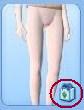
Custom files with this logo in 
create-a-sim are sim3packs. 
The logo looks like a bag. 
They can't be deleting in-game. 
Step 1: Most launcher icons are obvious, some are not. Use this list to help you establish the right icon for the hooker boots and other difficult ones. Bookmark this page, its by crinrict. The largest launcher icon list online.

Step 2: Open the launcher and go to the 'installed content' tab. Scroll through the list and select all the bad custom files. Click 'uninstall'. Once complete, they will be gone from your game and create-a-sim. 

(Hooray!)

Sims3pack not showing in the launcher? Click here

Step 3: Delete the 0x-codes associated to the bad CC from /sims3/dcbackup folder. You'll find the codes under each image of bad cc in the lists given above. 

Hidden Bad cc keeps circulating because it can stick to sims you save without being selected. It is then hidden until the next person installs it.

When you save a Sim, the game uses the files in the DCbackup folder to attach CC. It does not copy them from the game, c-a-s, the launcher or the downloads folder. ONLY from the DCbackup folder. Delete bad cc codes, but keep good cc codes.

Most users are oblivious their Sim is infected, people are not doing this on purpose to annoy you.  Delete Ox codes to stop the spread, especially if you share your sims online. 


Deleting from the Sim
__________________________________________________________________


These files are attached to an actual Sim. The only way to delete them is to delete the entire Sim wearing the items you want to remove. Custom Sims are deletable from inside the game in the pre-mades menu, and the launcher. You can use either, you don't need to do both.

If there are files you want to keep on this on the sim that needs deleting, you can either remove the items you don't want, then resave the sim. Or save the good items, including hair, to a new sim before you delete. (whichever is quicker)

The newly shared/saved sim will be in your docs/ea/sims3/exports folder. Double click to install the good content back into the game. Or drag and drop to the sims3/downloads folder and the files will then show up in the downloads tab of the launcher ready to be selected and installed.


More Tips: 
  • If you have a lot of Sims to go through try opening ..sims3/downloads folder and select the 'date modified' tab. This will put the content you have in date order which may help you narrow the search down.
  • You'll need to manually delete the sim from the downloads folder if it's still in there. That way you won't accidently reinstall the things you just got rid of.
  • If you have trouble with double click when installing a sim saved from exports folder. Drag and drop or copy the file in to the Sims3/downloads folder. It will now show up in the downloads tab of the launcher and you can install the Sim in the usual way.
Other problems related to this file type
Even when it is not technically bad cc, these files only have one body size and type. So if your sim gains a few pounds, or becomes pregnant, this outfit will remain the same. 

With clothing, you'll see breaks in necklines', ankle's and waists. With hair you'll see the scalp through the hair or hair goes through the face or body. If you tend to play your sims all the one size it won't bother you. Personally, I delete them. You can get equally good hair and clothing for free in sim3pack form, from TSR and these artists.


__________________________________________________________________

My strongest recommendation would be to not download whole Sims. But we all do! There are some easier ways of keeping on top of bad cc here for future downloads.

If you use CUSTARD, You can check you own sims and downloads for the hidden sims3pack files. Not the second file type though, unfortunately. The hidden sims3packs look like this: 


b = baby
p = Pre-school/toddler
c = Child
t = Teen
ya = Young Adult
m = Male
f = Female


Any questions? Let me know below (:


Wednesday, 10 October 2012

Why people upload bad CC?


Quite often they don't know they have - The common bad 'hidden' files copy themselves to new Sims created in CAS (Create-a-Sim) even when the Sim isn't wearing them. They cant be seen in the preview shots, and so they continue to spread very easily

If you have ever shared Sims on the exchange while having the typically known bad files in your game, it is very likely you too have spread them.
You can check your own files by downloading them and opening them with Custard or add the links to this post and I will look at them for you. Or you can email them to me peoplewatcherblog@gmail.com


Click to Enlarge

A Sticky CC theme:
The files in the launcher image have things in common. Opening them in Custard you can see they are in all ages including baby, all clothing types including; pregnancy, Naked, Singed and all career paths and levels.

Files that are made all categories included Naked mode tend to be the sticky ones. Or hidden ones, if you like. I am guessing here but I think the game mistakes them for genuine nude files that Sims have for showers and baths. They are located in the game but hidden from the average gamer. 


________________________________________________

Other strange goings on
I had a Sim loaded with four bad cc files. I isolated one piece of clothing at a time to see what happens. When I removed this skin 'front bum' the four files stopped sticking! 

I played with that skin and countless times BUT I have several copies of the skin Front bum and when I loaded it in to the game via a clean Sim who just happen to have that skin, this DID NOT make those same sticky files stick..

There are other skins that do this too, but I doubt it is the skin itself at fault and believe they are safe to play with. If you have one that is attaching sticky files, the only way to remove skins is to delete the Sim it came with unfortunately. More advice on that here Removing CC

The best advice I can offer is DO NOT download whole Sims. Download individual clothing and other items from The Sims Resource. Its' hosts oodles of free stuff, files are sims3packs (visible in the launcher) and all clearly marked how they are categorized.

Friday, 5 October 2012

Sims 3 Super Cute Toddler outfits (Free)

For Sim 3 PC


Some of my favourite Sims 3 Toddler outfits made by artists on theSimsResource website. The custom clothes on this page are free to download from TSR. 

I like using TSR because the files are the same as the exchange, so they are easy to install! They are Sims3packs. If you download Sets they come as RAR files. See How to unpack RAR files


Creations:545


Downloads:3,379,17
All toddler outfits By Ireveles18 

Click to Enlarge

by Punie
Creations:545


Downloads:3,379,1

Click to Enlarge
Creations: 14
Downloads 340,111


 ~ More Free toddler Clothes ~
By Weekly
By Weekly
By Weekly


I'll add some more to this post a little later =)

How to install RAR. files

Winrar. files are basically a file with lots of custom in one. When you unzip them they will be individual pack files that you recognise.

Step one
Make sure you have winrar. installed GET WINRAR

Step two
Right click on the winrar file and select EXTRACT HERE and the extracted files will appear in the folder usually directly under the winrar file you extracted them from.


Click to Enlarge


Step Three
Drag and drop them to the folder ...ElectronicArts/Sims3/Downloads if they aren't there already. Once they are in your downloads folder they immediately show up in the DOWNLOADS tab in your launcher. 
You can install them from the launcher by check boxing them and pressing the INSTALL button on the launcher or by highlighting them, right click and select "open" from the sims3/downloads folder. 


Click to Enlarge


Step Four
Check INSTALLED content tab to be sure they are in the game.
Play game and enjoy new custom content!


Sims 3 Tops with Boobs: How to remove them

There are quite a few tops that are categorized in all ages and both sexes. This will make the Male Sims appear to have boobs, and will cause severe glitches on children and toddlers. 

The top image of each top is what you need to look for in the launcher, and the image below that is how the top looks in Create a Sim.


I will add more to this post as I find them. In the meantime the majority of them are listed on Crinrict Bad CC page here
_____________________________________________________

Further Reading


Friday, 3 August 2012

Sims 3: Awesome Custom Swimwear

Fabulous Swimwear by Miraminkova

Over 1300 Sim items and 2 million downloads. There's plenty to choose from and massive amounts of swimwear. There are so many it's impossible to do them justice in one post! 

Here's a small preview of my favourites. The top 3 are from the free section and the others are for subscribers. There's currently 7 pages of free swimwear and 5 requiring subscription. 


Miraminkova also has a fine array of Swimwear Shoes, they're gorgeous! Make sure to check the description as some are saved in 'Athletic' I don't know about you, but heels at the gym just do my head in, think of their ankles! =)) 


Monday, 9 July 2012

Sims 3: Novelty Clothing

Here's some amusing clothing from The Sims Resource! Tv and game hero's yey! From toddler to Adult size. These are free to download, except one. Links to outfits and the people who made them Under each pic. Enjoy!


n
Hero T-shirts by lillka (Subscription only)


I haven't tested any of these yet by the way, be a while before I do =) If you play with them and have problems (I doubt it though) please pop back and let me know =) 

Thursday, 5 July 2012

Sims 3: Invisible feet!

There are more than one files that make sims walk around town with no feet
Sadly customs's with this icon can't be deleted from the launcher, it isn't in there.
Read more about the difference between the icons here


How to Remove
The original package is called NewMesh_Rose_shoes002.package, (according Crinrict) 
If these shoes came with a sim from the exchange then you'll need to remove the Sim they came with to get rid of them. You won't lose the normal cc in the launcher (unless you select it) 

If you don't know which Sim it came with and are struggling to find it, to save having to delete them all, you could try out these filtering tips.

Click to Enlarge
1. In Create-a-Sim Select your custom Sims and check through their outfits. If you're not sure if you've found the right shoe, try to colour it. In the paint palette you will see the shoes in the top left of the screen. 

2. For huge amounts of Sims try Opening The Sims 3 'downloads' folder. Click the 'date' tab to help you narrow down which group of Sims likely has them. You can remove the files from the downloads folder if you wish but you'll still need to un-install them via the launcher (or cas) to get them out the game.


Note: You will lose any other 'unpackaged' files (Symbol above) that also came with it. Including hair and make up. Sadly, there's no way to take the bad ones out individually. But you can remove any good content with this icon and save it on another Sim, then reinstall the saved sim after you delete the original. 

If you delete the sim wearing them via create-a-sim the shoes will go from CAS immediately, but you may still see the invisible feet on random selection or sims around the town until you shut down and reload the game. 


Good Hair for Sims 3

The Sims Resource is my favourite place. High quality CC, lots of free CC and nothing technical required. No need to make a mods folder and worry about updates! All the files are the exact same as the exchange. 

These are my current favourite Hairstyle Sets from the Free section. 
Clockwise from top left: 1. Dina female hairstyle 2. Jump male and female hairstyle 
3. Battler male and female hairstyle 4. Rainy season male and female all by Newsea 

Do check the Discription box before you download if you are looking for Just female
or Just Male and to check the age categories
Its' not just hair The Sims Resouce is good for. They have absolutely everything you can think of, from furniture to eyebrows! There is a community there too. You can resolve game problems, learn to create CC or just hang out. 

Getting a Subscription is a great idea and a nice way to give back for all the effort put in. There are many really good free items, almost too many! But I really recommend getting at least one subscription, one time. Better than any stuff pack from EA that's for sure! 


See more hair from the subbed section
___________________________________

Related pages
15 Hairstyles in one Sim  (1 male 1 female teen-elder size)
Long hair 20 styles in 4 Sims (Female)
5 Toddler-elder sets (Female)
10 Teen-Elder styles (Male)